 Clash Verge
Apple Silicon
For Macs with an Apple chip. The filename ends in aarch64.dmg.
Version 2.5.10 · 81 MB
Download Apple SiliconVersion 2.5.10 · DMG
Choose the right installer for Apple Silicon or Intel.
Installer files download directly from the official Clash Verge Rev GitHub repository. View all official release files.
Open Apple menu → About This Mac. If you see Chip followed by an Apple chip name, choose Apple Silicon. If you see Processor followed by an Intel name, choose Intel.
Standard setup requires macOS 12 Monterey or later.
For Macs with an Apple chip. The filename ends in aarch64.dmg.
Version 2.5.10 · 81 MB
For Macs with an Intel processor. The filename ends in x64.dmg.
Version 2.5.10 · 87 MB
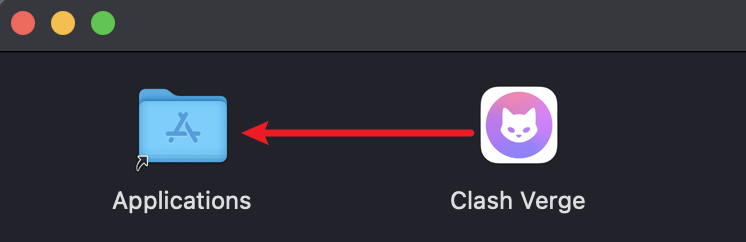
Open Finder → Downloads and double-click the .dmg file. In the window that opens, drag Clash Verge into Applications. If you’re updating, quit the running app before replacing the old copy.

Open Finder → Applications and launch Clash Verge. Once it opens, click the eject button next to the installer disk image in Finder. Follow the first-time setup guide to add your profile and check your connection.
Standard setup requires macOS 12 or later. Check your version in About This Mac. If you’re on Big Sur and your Mac supports an upgrade, update macOS before installing.
Back up any profiles you want to keep. Turn off System Proxy and Tun Mode if they’re on. With the app still open, go to Settings → System Setting. If there’s a trash icon beside Tun Mode, click it to Uninstall Service and approve the prompt if asked. Then quit Clash Verge.
Open Finder → Applications and move Clash Verge to the Trash.