 Clash Verge
DEB for Ubuntu and Debian
- Download DEB · amd64Version 2.5.10 · DEBFor
x86_64(64-bit Intel or AMD) - Download DEB · arm64Version 2.5.10 · DEBFor
aarch64(64-bit ARM) - Download DEB · armhfVersion 2.5.10 · DEBFor
armv7l(32-bit ARMv7)
Choose a DEB for Ubuntu or Debian, or an RPM for Fedora or RHEL.
Installer files download directly from the official Clash Verge Rev GitHub repository. View all official release files.
On Ubuntu or Debian, run dpkg --print-architecture in Terminal and match the result to a DEB package. On Fedora or RHEL, run rpm --eval '%{_arch}' and match the result to an RPM package. The files below are version 2.5.10.
x86_64 (64-bit Intel or AMD)aarch64 (64-bit ARM)armv7l (32-bit ARMv7)x86_64 (64-bit Intel or AMD)aarch64 (64-bit ARM)armv7hl (32-bit ARMv7)For a DEB or RPM package, open Terminal in the folder where you saved the file. The commands below use the x86_64 builds as examples. If you downloaded an ARM package, replace the filename with the one you downloaded and keep the ./ at the start.
Ubuntu or Debian
sudo apt install ./Clash.Verge_2.5.10_amd64.debFedora or RHEL
sudo dnf install ./Clash.Verge-2.5.10-1.x86_64.rpmArch Linux
If you already use yay, install the Arch User Repository package.
yay -S clash-verge-rev-bin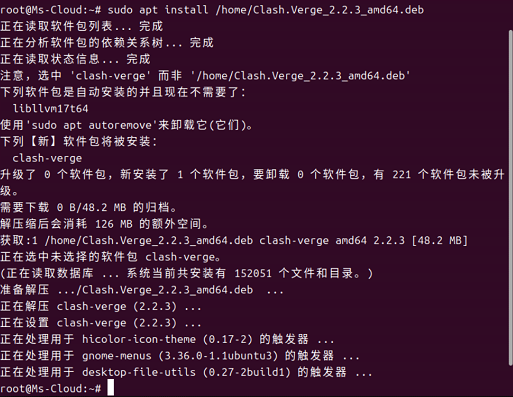
Search your apps menu for Clash Verge and open it. Follow the first-time setup guide to import your profile and check your connection.
dpkg --print-architecture and match the result to the DEB filename. This helps if you’re running a 32-bit operating system on a 64-bit ARM processor.libwebkit2gtk or libjavascriptcoregtk packages on Ubuntu 20.04, Ubuntu 24.04 is the recommended upgrade for this setup.If Terminal shows Error 71, a GBM buffer error, or a framebuffer error, try launching Clash Verge with this setting. It applies to this launch only.
WEBKIT_DISABLE_DMABUF_RENDERER=1 clash-vergeClash Verge Rev needs a graphical desktop. For a server you manage over SSH, you can run the Mihomo engine directly from the command line.
Version 2.5.10 provides DEB and RPM packages for Linux. Arch users can use the AUR package shown in the install steps.